Exporting Well Data
Changes made to the well data in Leapfrog Geothermal only affect the Leapfrog Geothermal database, not the original data files. You can export Leapfrog Geothermal well data, which is useful if you wish to keep a copy of well data outside the project.
You can:
- Export all data. See Exporting All Well Data.
- Export only a single data table. See Exporting a Single Well Data Table.
These export options export the well data tables using To and From values to indicate location information. If you wish to export data with X-Y-Z values, extract points data using one of the following options:
- Extracting Contact Points from Well Data
- Extracting Intrusion Values from Well Data
- Extracting Interval Midpoints from Well Data
Then export the data object as described in Exporting Points Data.
Exporting All Well Data
To export all well data, right-click on the Wells object and select Export. The Export Well Data window will appear:
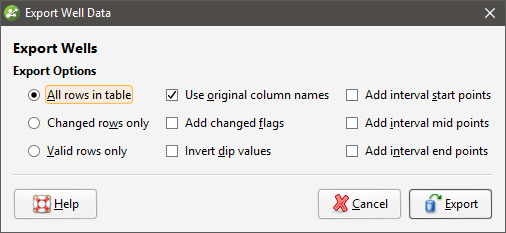
Once you have selected how you wish to export the data, click OK. The Export Well Data Files window will appear:
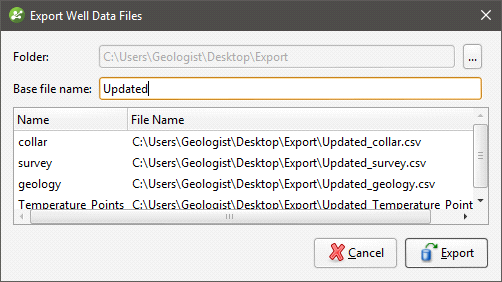
The list shows the files that will be created, one for each data table. Choose the Folder where the files will be saved, then enter a Base file name, which will be added to the front of each file name.
Click Export to save the files.
Exporting a Single Well Data Table
To export a single well data table, right-click on that table and select Export. The Export Well Data window will appear:
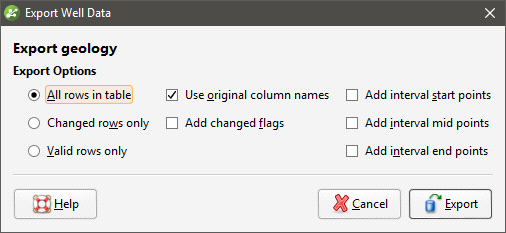
Once you have selected how you wish to export the data, click OK. You will be prompted for a filename and location.
Got a question? Visit the My Leapfrog forums at https://forum.leapfrog3d.com/c/open-forum or technical support at http://www.leapfrog3d.com/contact/support