
Array Base Properties
In the database window, select a data array channel and use the right-click menu option Array Base Properties to define or edit the increment base property of a selected data array channel.
Array Base Properties dialog options
|
Base
|
Depending on the type of geophysical data, array increments may represent time, distance, velocity, or other parameters. Select the appropriate base type that aligns with your processing goals. Once selected, the label at the top of the dialog will update, indicating the array size. Available base types include:
|
|
Units |
Specifying units is optional. The drop-down list is populated based on the selected Base type. |
|
Initial value | Delay time | Base frequency |
This field is context-sensitive and reflects the nature of the Base parameter. It defines the offset to the first array element, which may not start at zero. This value—whether Initial value, Delay time, or Base frequency—is stored in the data array header. |
|
Time windows | Increment | Frequencies |
The label is contextually set relative to the Base parameter. You can enter the property increments in a few different ways.
For vertical properties:
Although you are not prevented from defining the Depths attribute with a negative increment, you are discouraged from doing so because this combination is equivalent to defining the Elevations attribute with a positive increment. |
|
[Copy from...] |
This button appears only if another array channel of equal dimension has a base property.
|
|
[Import from database] |
Click this option to launch the Import Time Windows from Database dialog to retrieve property information from an external database. |
|
[Export to database] |
Click this option to save current property configuration to a database. You’ll be prompted to enter a name for the output database. |
|
Index offset |
If the window database has more elements than the current array channel, use this field to offset the 1st element of the array in focus and assign a later time to it. |
|
Show hidden windows |
By default, array elements without data are hidden. Check this box to display all elements, including those without assigned data. |
Application Notes
This tool is designed to concatenate the size of the database when the data array increment of a channel is the same throughout the database. This information is stored in the channel header and is required by several Oasis montaj extension tools. You can set, export, and import array properties using this dialog.
The table at the end of the dialog displays:
-
Number of increments
-
Start
-
Middle
-
End
-
Width values
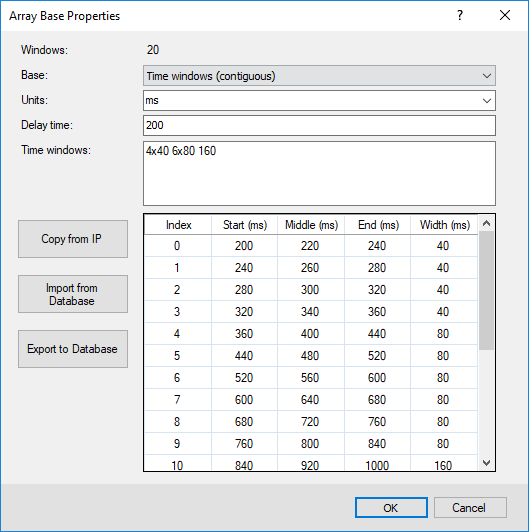
Figure 1: Contiguous time windows. Time increments are provided as a set of consecutive time windows.
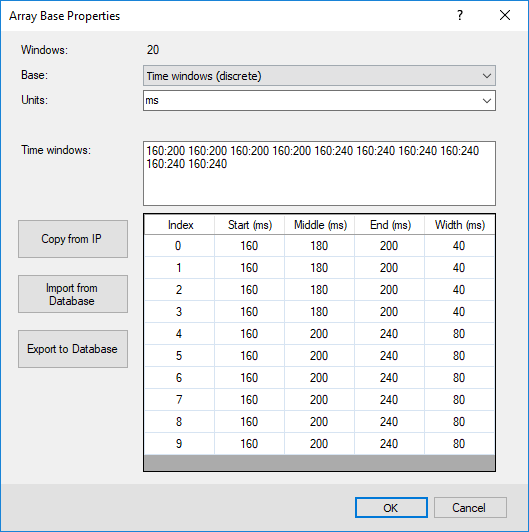
Figure 2: Discrete time windows. Time gates are provided as a set of potentially overlapping start and end times.

Figure 3: The widths can also be constants.
Got a question? Visit the Seequent forums or Seequent support
Copyright (c) 2025 Bentley Systems, Incorporated. All rights reserved.
Privacy | Terms of Use