
Grid Volume
Use the Grid and Image > Utilities > Grid Volume menu option (GRIDVOL GX) to calculate the volume of space defined by a grid surface—both above and below a reference base.
Grid Volume dialog options
Volume Report dialog options
|
Volume above reference base |
Volume of the grid above Script Parameter: GRIDVOL.ABOVE |
|
Volume below reference base |
Volume of the grid below Script Parameter: GRIDVOL.BELOW |
|
Difference |
Difference between the above and below volumes. (Output only) Script Parameter: GRIDVOL.DIFF |
Application Notes
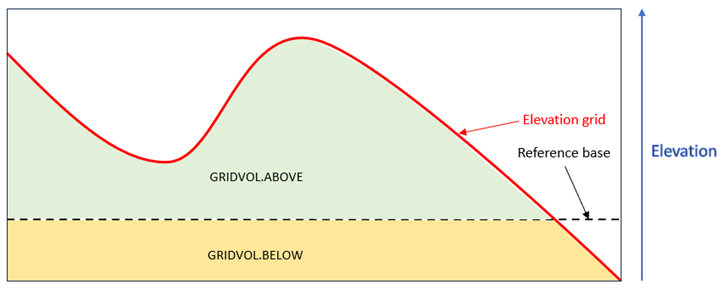
The grid volume is calculated by summing the product of the grid area times the distance between each non-dummy grid point and the supplied reference base. If the grid contains elevations lower than the reference base, volumes will be reported for both the areas above and below that base, as illustrated in the diagram and explained below.
-
GRIDVOL.ABOVE,GRIDVOL.BELOW, andGRIDVOL.DIFFare output-only values. -
Both
GRIDVOL.ABOVEandGRIDVOL.BELOWare reported as positive values. -
GRIDVOLis useful for determining the volume of material defined by grid surfaces in topographic applications. Some geophysical applications also make use of volumes under anomalies to derive physical properties (e.g., gravity). -
The calculated volume of the grid is displayed as a floating-point number in the default output. This output can be piped to another application if needed.
Got a question? Visit the Seequent forums or Seequent support
Copyright (c) 2025 Bentley Systems, Incorporated. All rights reserved.
Privacy | Terms of Use