
Butterworth Filter
Use the Butterworth option to apply a Fast Fourier Transform (FFT) Butterworth filter to a channel.
The filter option is available with the following extensions and menus:
- 1D FFT > 1D Filtering
- Moving Platform Gravity > Filters > Apply Single FFT Filter
Butterworth filter options
Application Notes
The Butterworth filter is ideal for straightforward high-pass and low-pass filtering because it provides easy control over the filter roll-off degree while keeping the central wavenumber fixed. If ringing occurs, reduce the degree until the result is acceptable.
A common, but more complex alternative is the Cosine Filter.
Butterworth Filter
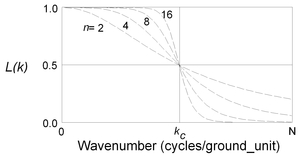
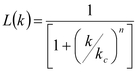
Parameters:
k0: Central wavenumber of the filter.
n: Degree of the Butterworth filter function (default = 8).
0/1: Residual/Regional flag indicating whether a residual high-pass or a regional low-pass filter is applied. By default, the system applies a regional filter.
Got a question? Visit the Seequent forums or Seequent support
Copyright (c) 2026 Bentley Systems, Incorporated. All rights reserved.
Privacy | Terms of Use