
Continuation Filter
Use the Continuation option to apply a Fast Fourier Transform (FFT) continuation filter to a channel.
The filter option is available with the following extensions and menus:
- 1D FFT > 1D Filtering
- Moving Platform Gravity > Filters > Apply Single FFT Filter
Continuation filter options
|
Continuation distance |
Continuation distance in ground units (> 0). Default = 0 Script Parameter: FFTCONT.DIST |
|
Butterworth low-pass |
Low-pass cutoff wavelength for Butterworth filter. Default = 1 Script Parameter: FFTCONT.LP |
|
Direction (up or down) |
Direction for continuation: Up or Down. Default = Down Script Parameter: FFTCONT.DIR |
Application Notes
Downward Continuation
Used to enhance responses from deep sources by effectively moving the observation plane closer to them.
-
It is not theoretically possible to continue through a potential field source.
-
Short-wavelength signals can mimic shallow sources and must be removed to avoid high-amplitude, short wavelength noise.
-
To reduce noise, set the LP parameter to 1–1.5 times the continuation distance.
Upward Continuation
Considered a clean filter with minimal side effects, often used to remove or minimize the effects of shallow sources and noise in grids.
-
Upward continued data can be interpreted numerically and modeled, unlike many other filter processes.
Downward Continuation Filter
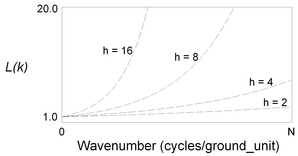
h: Distance (ground units) to continue down relative to the plane of observation.
Upward Continuation Filter
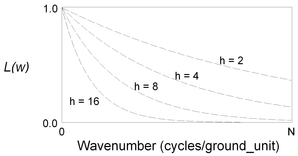
h: Distance (ground units) to continue up relative to the plane of observation.
See Also:
Got a question? Visit the Seequent forums or Seequent support
Copyright (c) 2026 Bentley Systems, Incorporated. All rights reserved.
Privacy | Terms of Use