
Apparent Density Calculation Filter
Use the Apparent Density Calculation option to apply a Fast Fourier Transform (FFT) apparent density filter to a channel.
The filter option is available with the following extensions and menus:
- 1D FFT > 1D Filtering
- Moving Platform Gravity > Filters > Apply Single FFT Filter
Apparent Density Calculation filter option
|
Depth to the top of model |
Depth to the top of the model. Default: 1 Script Parameter: FFTDENS.DEPTH |
|
Thickness of earth model |
Thickness of the earth model in ground units. Default: 1 Script Parameter: FFTDENS.THICK |
|
Low-pass cutoff |
Low-pass Butterworth filter cutoff wavelength. Default: 1 Script Parameter: FFTDENS.LP |
|
Background density |
Background density in g/cm3. Default: 0 Script Parameter: FFTDENS.DENS |
Application Notes
To ensure correct density units, the input data fiducial base must be in meters.
The low-pass filter can be used to remove noise in the data that would otherwise be amplified by downward continuation.
A low-pass cutoff of 1 to 1.5 times the depth is normally appropriate.
Apparent Density Filter
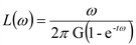
Parameters:
ω = wavenumber
t = Thickness (in ground units) of the earth model
G = Gravitational constant
d = Background density (g/cm³)
See Also:
Got a question? Visit the Seequent forums or Seequent support
Copyright (c) 2026 Bentley Systems, Incorporated. All rights reserved.
Privacy | Terms of Use