Importing and Exporting Drillhole Groups
This topic describes the options for importing and exporting planned drillhole groups. It is divided into:
See Drillhole Planning Groups for an overview of working with drillhole groups in Leapfrog Energy.
Planned drillhole groups can also be imported from and published to Seequent Evo. See the Seequent Evo Drilling Campaigns topic for more information.
Importing Planned Drillholes
Leapfrog Energy can import planned drillholes from files in CSV format. The columns expected are:
- A drillhole identifier
- X-Y-Z coordinates for the planned drillhole
- Azimuth
- Dip
- Lift rate
- Drift rate
- Distance
- Extension
- Target Depth
- Comment
When importing planned drillholes, you can import them into a new group or into an existing group. To import planned drillholes, right-click on the Planned Wells folder or on a group and select Import Planned Drillholes. If the IDs in the file are already in the project, you will be prompted to resolve the conflict:
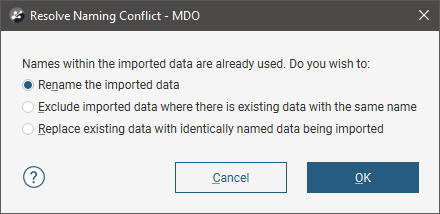
You can:
- Rename the imported drillholes. Leapfrog Energy will automatically assign new names and import the planned drillholes.
- Exclude planned drillholes that already exist in the project. Planned drillholes will only be imported if they have an identifier that does not already exist in the project.
- Replace existing planned drillholes with the imported drillholes. Use this option if you are importing information previously exported from the project and subsequently updated in an external application.
Click OK to process the file.
If there are no conflicts, the planned drillholes will be added to the project.
Exporting Planned Drillholes
There are three options for exporting planned drillholes as files:
Whichever option you choose, you can use a filter to limit the set of drillholes exported.
Exporting Planned Drillhole Parameters
Exporting planned drillhole parameters exports the drillholes as a *.csv file.
To export parameters for planned drillholes, right-click on a drillhole group and select Export Parameters. In the window that appears, select the drillholes you want to export. The total length will be updated as you add or remove drillholes.
You can constrain the list of drillholes to be exported using an existing Query Filter.
In Leapfrog Energy, positive dip points down for planned drillholes. To invert the dip for exported planned drillholes so that negative dip points down, tick the box for Invert dip on export.
Click Export. Navigate to where you wish to save the file, then click Save.
Exporting as Polylines
Planned drillholes can be exported as polylines in the following formats:
- Leapfrog Polylines (*.lfpl)
- Leapfrog Mining Polylines (*.csv)
- Drawing Interchange Polylines Files (*.dxf)
- Surpac String Polyline Files (*.str)
- Gocad Polylines Files (*.pl *.ts)
- MineSight Polylines Files (*.srg)
- Datamine Polylines Files (*.asc)
- Micromine Polylines Files (*.str *.asc)
- AutoCAD Drawing Files (2013/LT2013) (*.dwg)
- Bentley Drawing Files (v8) (*.dgn)
To export planned drillholes as polylines, right-click on a drillhole group and select Export as Polylines. In the window that appears, select where you wish to save the file, enter a file name, select the file type from the Save as type options, and then click Save.
Exporting as Interval Tables
In order to export planned drillholes as interval tables, you must first evaluate at least one model on the drillhole group. Once you have done this, right-click on a drillhole group and select Export as Interval Tables.
Select the evaluations you wish to include, then click Export. In the Export Planned Drillholes window, the files that will be created are listed, one each for the collar and survey table and one for each selected evaluation. Change the Base file name, if required, choose a folder in
