Drillhole Planning Groups
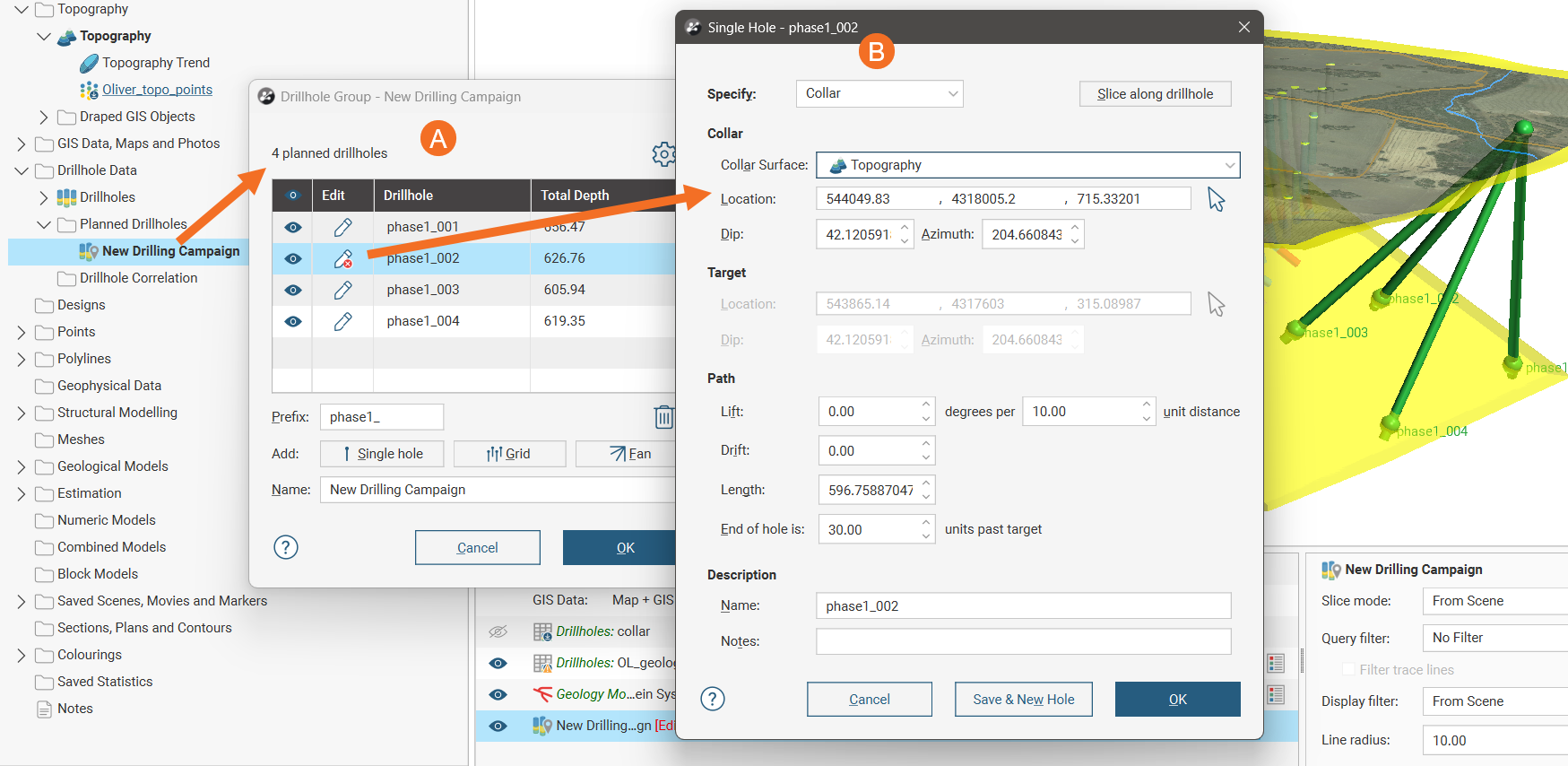
In Leapfrog Geo, a drillhole group acts as a container for planned drillholes in a drilling campaign. For example, here a drillhole group shows planned drillholes (A), with one drillhole open for editing, its parameters shown in the Single Hole window (B).
The advantage of organising planned drillholes into groups is that:
- Default values for the naming prefix and path can be used to quickly plan drillholes in bulk.
- Models can be evaluated on the group for viewing drilling prognoses, instead of evaluating models onto drillholes one-by-one.
- A group can be displayed in the scene as a single object.
- A group can be exported, rather than exporting multiple drillholes one-by-one.
Filters can be defined for selecting subsets of holes, which is useful when:
- Displaying the group in the scene
- Using the planned drillholes elsewhere in the project
- Exporting the group
This topic describes working with drillhole groups in Leapfrog Geo. It is divided into:
- Creating a New Drillhole Group
- Drillhole Planning Groups
- Evaluating Models on Planned Drillholes
- Defining Filters for Planned Drillholes
- Displaying Planned Drillholes
- Moving Planned Drillholes to Another Group
Separate topics describe the different methods for adding drillholes to the group:
Other topics describe:
Creating a New Drillhole Group
To create a new drillhole group, right-click on the Planned Drillholes folder and select New Drillhole Group. This opens a Drillhole Group window, which serves as the container for all drillholes in the group, even if there will be just one.
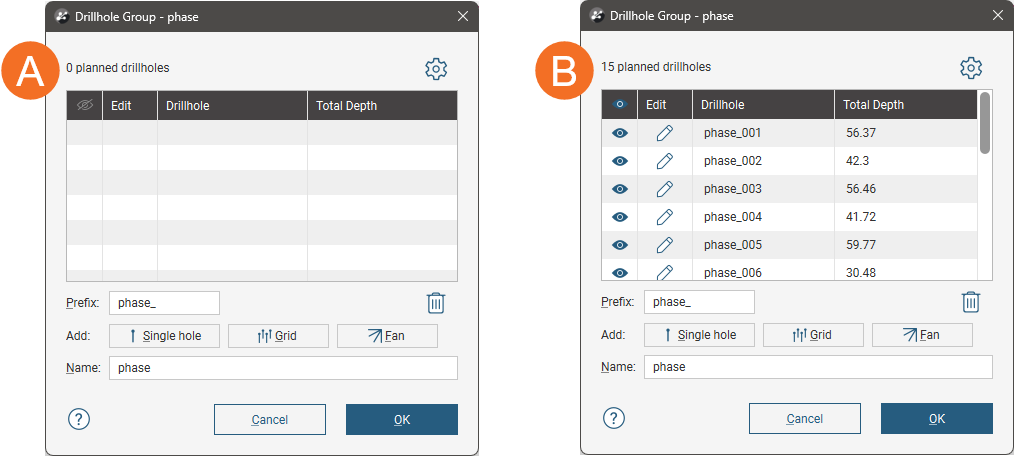
A new drillhole group (A) will be empty; once drillholes have been added, they will be listed in the group (B):
There are three methods for adding drillholes to the group:
- Define drillholes one at a time, adding subsequent drillholes using a configurable offset. Click the Single hole button, which opens a window in which you can set the collar, target and path for the new drillhole. Adding drillholes in this way is described in the Planning Single Drillholes topic.
- Define multiple drillholes in a grid arrangement. Click the Grid button. Adding drillholes in this way is described in the Planning a Grid of Drillholes topic.
- Define multiple drillholes using a fan arrangement. Click the Fan button. Adding drillholes in this way is described in the Planning a Fan of Drillholes topic.
Each method adds drillholes to the group in a manner that does not link them to the method used to create them. Editing any drillhole in the group opens the Single Hole window in which you can make any necessary changes to the drillhole collar, target and path. What this means for the grid and fan methods is that the grid or fan used in generating the drillholes is not retained in the project; the two methods are simply shortcuts for quickly defining multiple drillholes in a grid or a fan.
The Prefix will be used in naming each drillhole that will be added to the group.
Over time, you can change the prefix to reflect different drilling campaigns; changing the prefix does not affect the names of drillholes already defined.
When the drillhole group is open, its contents will be displayed in the scene. You can hide some or all drillholes by using the visibility button ( ).
To delete a drillhole, click on it in the list, then click the Delete button ( ). You can select multiple drillholes and delete them at once.
The grid and fan drilling dialogs have an Options and Statistics tab with a Statistics section that contains information useful for making decisions about the planned campaign:
- Number of holes: How many holes will be created according to the current settings
- Drilling total: What total linear distance will be drilled if the plan is executed
- Minimum hole length: The length of the shortest planned drillhole
- Average hole length: The mean length of the planned drillholes
- Maximum hole length: The length of the longest planned drillhole
Evaluating Models on Planned Drillholes
Any model in the project can be evaluated on a drillhole group. Evaluating models onto a drillhole group is required for:
- Viewing drilling prognoses. See the Viewing Drilling Prognoses topic.
- Exporting the drillhole group as interval tables. See the Importing and Exporting Drillhole Groups topic.
Evaluated models are also included with the drillhole group when it is published to Seequent Evo. See Publishing to Seequent Evo in the Seequent Evo Drilling Campaigns topic.
Right-click on a drillholes object in the project tree, then select Evaluations. In the Select Models to Evaluate window, move model data columns you want to evaluate onto the drillholes from the Available list to the Selected list.
Defining Filters for Planned Drillholes
Defining a filter for a drillhole group makes it easier to select a subset of the drillholes:
- When the group is displayed in the scene
- When the group is used elsewhere in the project, e.g. in a section layout
To define a filter, right-click on the group and select New Filter. Select which drillholes to include in the filter and enter a name for it. The filter will be saved in the project tree as part of the group.
Displaying Planned Drillholes
Once there are planned drillholes in the group, you can display the group in the scene. Do this by dragging the group from the project tree into the scene. To control what drillholes are displayed in the scene, open the group and use the show/hide buttons (A):
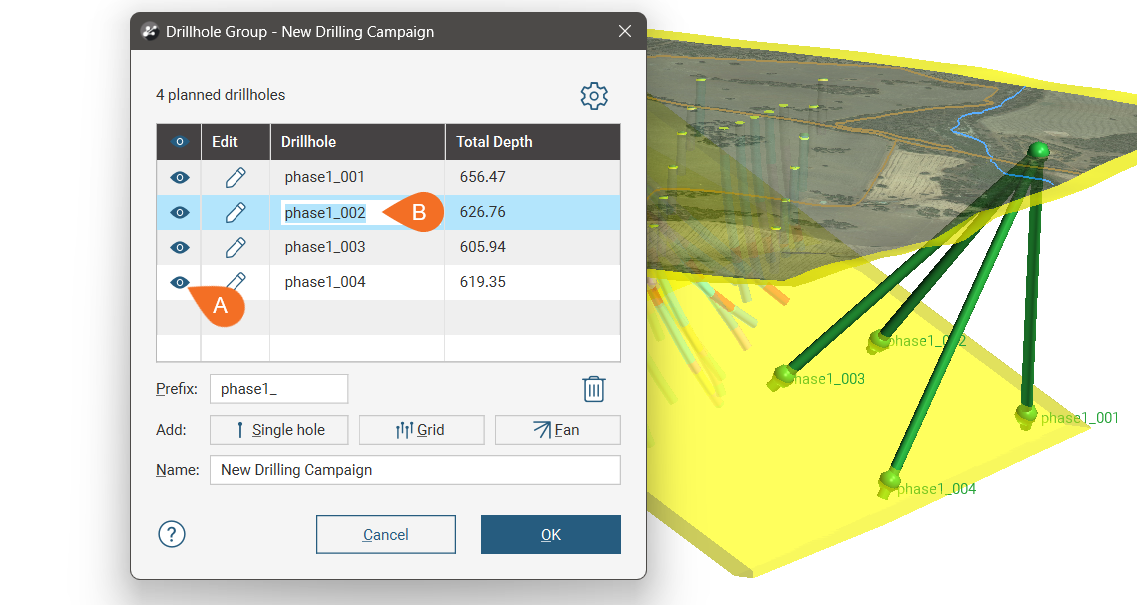
You can edit a drillhole‘s name in this window by double-clicking on it (B).
Search for planned drillholes in the list by pressing Ctrl-F. A Find window will appear that you can use to search the list.
To update a drillhole, click its Edit button.
Moving Planned Drillholes to Another Group
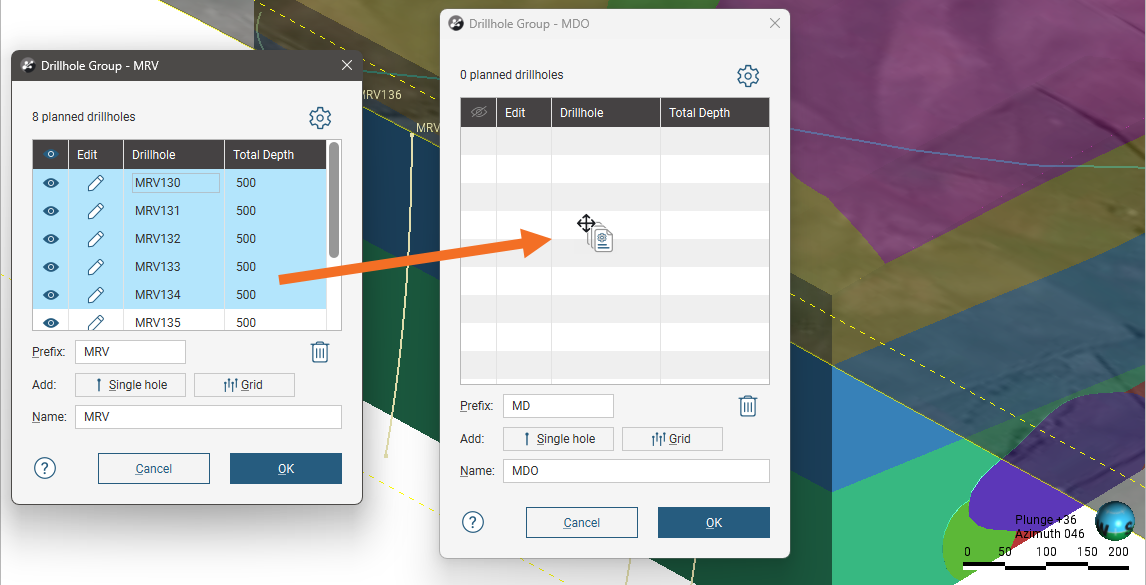
You can ‘move’ planned drillholes to a different group by opening both groups and copying drillholes from one group to the other.
To move planned drillholes to a different group:
- Open both groups.
- Select the drillholes you wish to move to the other group.
- Drag the drillholes to the other group.
- Delete the copied drillholes from the original group.
For example, here the drillholes selected in the first group are being copied into a second group that is empty: