
Bandpass (BPAS)
Use the Bandpass option to apply a bandpass filter.
Bandpass Filter dialog options
|
Long wavelength cutoff |
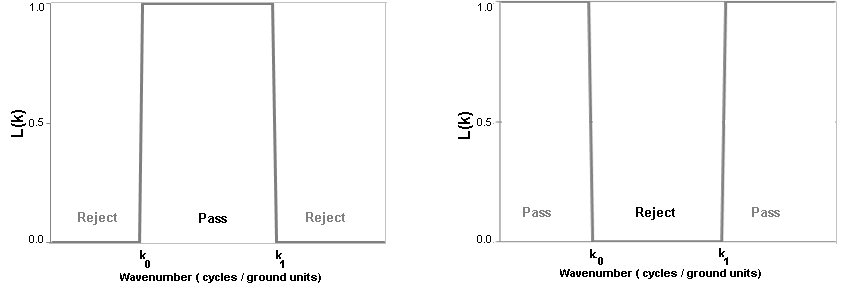
The long wavelength cutoff in ground units. As shown in the illustration, this parameter corresponds to k0-1. |
|
Short wavelength cutoff |
The short wavelength cutoff in ground units. As shown in the illustration, this parameter is equivalent to k1-1. |
|
|
Choose whether to pass or reject the defined band. The default setting is Pass. |
 Pass
Pass Reject
Application Notes
The bandpass filter (BPAS) can be used to pass or reject a selected range of wavelengths within the data. However, applying a simple cutoff filter to an energy spectrum almost invariably introduces a significant amount of oscillation (Gibbs’ Phenomenon). This filter is included for completeness, but we recommend using a tapered filter such as the Butterworth filter (BTWR).
Bandpass Filter
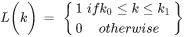
Where:
|
k0 |
Low wavenumber cutoff (cycles per ground unit). |
|
k1 |
High wavenumber cutoff (cycles per ground unit). |
Wavenumber Domain Variable Definitions
|
The following variables are used in the wavenumber domain: |
||
|
k |
Wavenumber increment, used to depict a radially symmetrical variable. |
Where: np: number of points cs: cell size |
|
μ |
X-component of the wavenumber. |
|
|
v |
Y-component of the wavenumber. |
|
|
r |
Radial component of the wavenumber. |
|
|
θ |
Angular (polar) component of the wavenumber. |
|


Ground unit refers to the survey ground units defined in your grid (e.g., metres or feet). Ground units may also be left unspecified.
Got a question? Visit the Seequent forums or Seequent support
Copyright (c) 2026 Bentley Systems, Incorporated. All rights reserved.
Privacy | Terms of Use