
Apparent Density Calculation (DENS)
Use the Apparent Density Calculation option to apply an apparent density calculation filter.
Apparent Density Calculation dialog options
|
Thickness of model layer |
Thickness, in ground units, of the Earth model (t). |
|
Background density |
Background density in g/cm3 to be added to the density-contrast map. The default is 0, which means the density map is relative to the average density. |
Application Notes
Apparent density mapping assumes a simple model layer of fixed thickness and varying density to explain an observed gravity field. The response is assumed to be caused by a collection of vertical, square-ended prisms of infinite depth extent, whose horizontal dimensions are equal to the input grid‑cell size. This is an idealized approximation—hence the term apparent.
It is highly recommended to downward-continue the data to a point close to the top surface of the source model using the CNDN filter operator.
Apparent Density Calculation
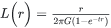
Where:
|
G |
Gravitational constant. |
|
t |
Thickness, in ground units, of the Earth model. |
Wavenumber Domain Variable Definitions
|
The following variables are used in the wavenumber domain: |
||
|
k |
Wavenumber increment, used to depict a radially symmetrical variable. |
Where: np: number of points cs: cell size |
|
μ |
X-component of the wavenumber. |
|
|
v |
Y-component of the wavenumber. |
|
|
r |
Radial component of the wavenumber. |
|
|
θ |
Angular (polar) component of the wavenumber. |
|


Got a question? Visit the Seequent forums or Seequent support
Copyright (c) 2026 Bentley Systems, Incorporated. All rights reserved.
Privacy | Terms of Use