
Changing Borehole Planning Defaults
See Borehole Planning Groups for an overview of working with borehole groups in Leapfrog Works.
Borehole planning defaults are set on a per-project basis, and when you are starting to plan a new drilling campaign, it is a good idea to update the default planning parameters before you start adding boreholes to a group.  ):
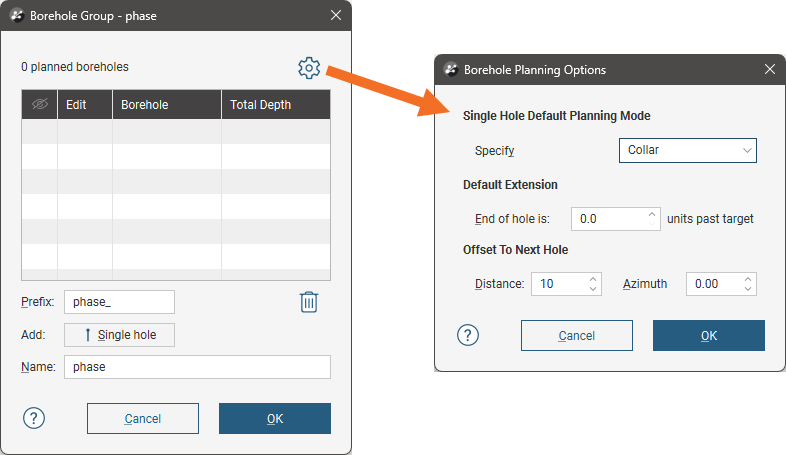
There are two planning modes available:
- Collar. The collar serves as the starting point in defining the borehole. This mode suits scenarios where the drilling site is the primary constraint. Specify the collar’s location, dip and azimuth, along with the path. The target’s parameters will be calculated using the collar and path parameters. You can define the collar’s location by clicking in the scene or by entering the coordinates in the Single Hole window.
- Target. The target serves as the starting point in defining the borehole. This mode suits scenarios where drilling to a particular contact, zone or depth is the primary consideration and the collar location is not the primary constraint. Specify the target and its path; the borehole‘s collars parameters will be calculated from the target and path. You can define the target’s location by clicking in the scene or by entering the coordinates in the Single Hole window.
Choose which mode you will be using for the borehole group.
The Default Extension is the length by which the borehole extends past the Target location.
The Offset To Next Hole values apply when defining multiple boreholes, i.e. when you click the Save .& New Hole button in the Single Hole window.
Enter the information required and click OK. The new settings will be applied to the next new planned borehole added to a borehole group.