
Band-pass Filter
Use the Band-pass option to apply a Fast Fourier Transform (FFT) band-pass filter to a channel.
The filter option is available with the following extensions and menus:
- 1D FFT > 1D Filtering
- Moving Platform Gravity > Filters > Apply Single FFT Filter
Band-pass filter options
|
Short wavelength cutoff |
Short wavelength cutoff value (in ground units). Default = 0.1 Script Parameter: FFTBANDP.SHORTW |
|
Long cutoff -> |
Long wavelength cutoff value. Enter 0 for an Infinite cutoff wavelength (in ground units). Default = 1 Script Parameter: FFTBANDP.LONGW |
|
Pass or reject defined band |
Select whether to Pass or Reject the defined band. Default = Pass Script Parameter: FFTBANDP.PASS |
Application Notes
This filter can be used to pass or reject a range of wavenumbers from the data. However, applying such a simple cutoff filter to an energy spectrum almost invariably introduces a significant amount of ringing (also known as Gibb's Phenomenon). We recommend using a smoother filter, such as the Butterworth filter.
Band-pass Filter
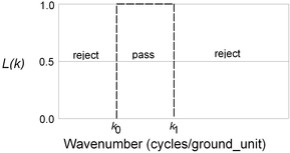
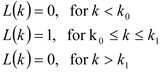
Parameters:
k0: Low wavenumber cutoff in cycles/ground unit.
k1: High wavenumber cutoff in cycles/ground unit.
0/1: If 1, pass the defined band; otherwise, reject the defined band. The default is to pass the band.
Got a question? Visit the Seequent forums or Seequent support
Copyright (c) 2026 Bentley Systems, Incorporated. All rights reserved.
Privacy | Terms of Use