
Butterworth Notch (BTWRN)
Use the Butterworth Notch option to apply a Butterworth Notch filter.
Butterworth Notch Filter dialog options
|
Wavelength cutoff |
Central wavelength to be rejected, in ground units. |
|
Filter order |
The order n of the filter, which controls the sharpness of the notch. Default is 8. |
Application Notes
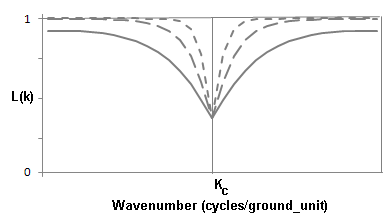
The Butterworth Notch filter rejects a selected mid‑wavenumber range while preserving both the low and high extremes of the wavenumber spectrum. The Filter order controls how sharply the filter attenuates the selected wavenumber region: higher values produce a steeper transition at the cutoff boundaries.
Butterworth Notch Filter
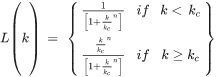
Where:
|
kc |
Wavenumber cutoff (cycles per ground unit). |
|
n |
Positive integer determining the sharpness of the cutoff. |
Wavenumber Domain Variable Definitions
|
The following variables are used in the wavenumber domain: |
||
|
k |
Wavenumber increment, used to depict a radially symmetrical variable. |
Where: np: number of points cs: cell size |
|
μ |
X-component of the wavenumber. |
|
|
v |
Y-component of the wavenumber. |
|
|
r |
Radial component of the wavenumber. |
|
|
θ |
Angular (polar) component of the wavenumber. |
|


Ground unit refers to the survey ground units defined in your grid (e.g., metres or feet). Ground units may be left undefined.
Got a question? Visit the Seequent forums or Seequent support
Copyright (c) 2026 Bentley Systems, Incorporated. All rights reserved.
Privacy | Terms of Use