
Introduction to instances, workspaces and user roles
This topic describes important concepts that will help you understand how data is organised in Evo and how access to data is controlled. This topic is divided into:
Evo instances
An Evo instance is the highest-level deployment of the Evo platform that is owned by an organisation and deployed to a regional hub. Your organisation may have multiple Evo instances, perhaps deployed to different regional hubs. In an instance, data is organised into workspaces where access is controlled by assigning users and granting them different workspace permission levels.
Both the data in each Evo instance and its pool of users are separate from other Evo instances. The workspaces used for working with data are unique to the instance they were created in; they cannot be shared to other instances.
User roles
User roles determine what a specific member of the instance can do. Evo instances have two main roles:
- Evo Users have limited access to the instance, based on what workspaces they have permissions for.
- Evo Admins have full access to the instance.
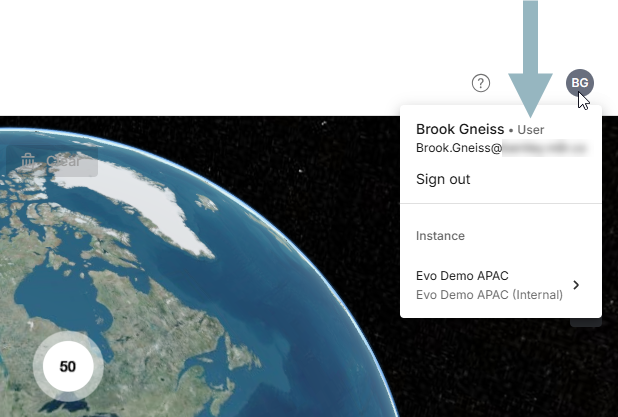
To find out what your user role is for the instance you are currently working in, click the user ID menu, which will show your initials. What role you are assigned is indicated next to your name:
If you are an instance admin new to Seequent Evo, see the Introduction to the Evo admin role topic, which describes the differences between the two roles from the perspective of an Evo admin.
Workspace permissions
In workspaces, there are three different permission levels that determine what workspace members can do:
- Workspace Viewers can view and search all data in the workspace.
- Workspace Editors can edit data and add data to the workspace. A workspace editor can also share the workspace by adding instance members, although editors cannot assign permissions higher than their own.
- Workspace Owners can edit data and add data to the workspace, and can share the workspace. Workspace owners can also delete the workspace. By default, the user who creates a workspace is assigned as a workspace owner. A workspace can have multiple workspace owners, if required.
See the Workspace permissions topic for a table that summarises what is possible at the different permission levels.