
Getting Started
MX Deposit is a cloud-based platform for collecting, managing, sharing and accessing drillhole and sample data. On this page, you will find useful information to help you get started, wherever you’re using MX Deposit in your workflow.
- Signing In to MX Deposit
- MX Deposit Web App Versions
- Troubleshooting Resources
- General Information on the MX Deposit Platform
Signing In to MX Deposit
To use MX Deposit, you need a Seequent ID and a subscription. Once your subscription has been set up, you will receive an email inviting you to your MX Deposit subscription.
- If you do not already have a Seequent ID, use the link in the email to create one.
- If you already have a Seequent ID, simply sign in to My Seequent.
When you have signed in to My Seequent, your invitation to MX Deposit will be displayed on the home page.
Once you have accepted your invitation, you can sign in to the MX Deposit web app or one of the mobile apps using your Seequent ID.
How you work with MX Deposit depends on how you are using MX Deposit in your workflow.
Logging Data
If you are logging, you can use one of the mobile apps. Start with the Introduction to the MX Deposit Mobile Apps topic.
You can also log data using the web app. The process is similar to logging with one of the mobile apps.
Managing Data
If you are managing data, use the MX Deposit web app. Start with the Introduction to the MX Deposit Web App topic.
Administering the MX Deposit Account
If you are an admin configuring your organisation’s MX Deposit account, use the MX Deposit web app. Start with the For MX Deposit Admins topic.
MX Deposit Web App Versions
The MX Deposit web app is available in two versions, a new app (A) and an old version (B):
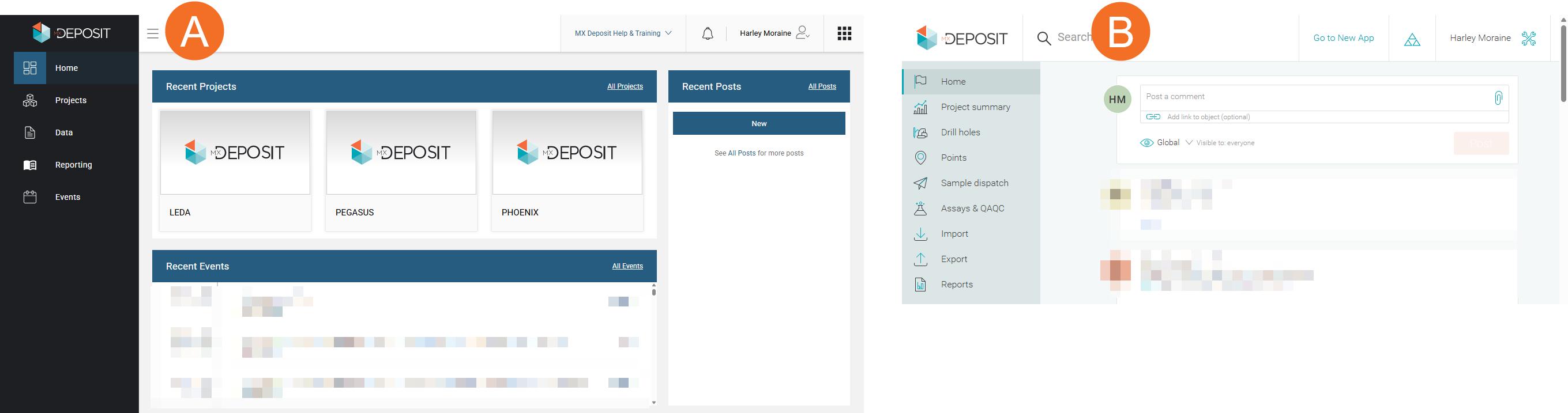
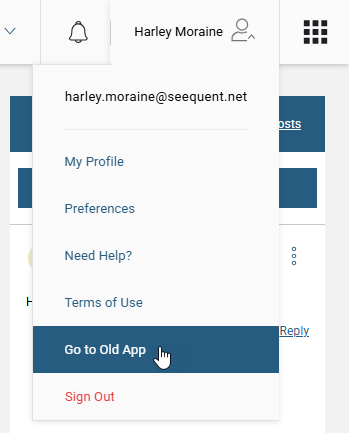
When you sign in to MX Deposit at app.mxdeposit.net, you will be in MX Deposit’s new app. If you prefer to work in the old version, you can switch to it from the account menu:
Whichever version you use, there is no change to MX Deposit Cloud services; both versions use the same data.
The online help is in the process of switching over to displaying workflows in the new app. While this update proceeds, some topics will continue showing the old app. However, workflows in the new web app are by-and-large similar to those in the old app and help topics showing the old app will be useful for working in the new app.
Troubleshooting Resources
MySeequent contains troubleshooting resources for MX Deposit. Follow this link to search for the latest support articles for MX Deposit.
Troubleshooting Sign In Issues
Sometimes new subscribers to MX Deposit have issues signing in and receive one of the following messages:
You don’t have permission to access MX Deposit
There are two common reasons for this error message:
- You have been added to a subscription but have not yet accepted the invitation. Sign in to My Seequent and accept the invitation.
- You have been added to a subscription using an email address other than your primary Seequent ID email address. Either sign in to My Seequent and update your primary email address or ask your MX Deposit admin to assign the subscription using your primary Seequent ID email address.
Your subscription is invalid
This occurs when you have not yet been assigned to a subscription. Contact your MX Deposit admin.
General Information on the MX Deposit Platform
To find more general information on the MX Deposit platform, visit www.seequent.com and search for "MX Deposit".
For detailed information on the features and benefits of the MX Deposit platform, visit the MX Deposit product page on seequent.com.