
Remove Aircraft and Cosmic Effects
Use the RPS > Remove Aircraft and Cosmic Effects option (geogxnet.dll(Geosoft.GX.Radiometrics.RemoveAircraftAndCosmicEffects;Run)*) to remove aircraft and cosmic background contributions and produce background-corrected airborne radiometric data. For more details, refer to the Application Notes below.
To rerun the process with previous settings, select the header cell of any channel created by the process, then right-click to open the context menu. The last item in the menu represents the most recently executed process (GX). Select it to reopen the associated dialog. From there, you can rerun the process with the existing settings, adjust parameters before execution, or simply close the dialog. Learn more about Dynamic Process Links (Makers).
Remove Aircraft and Cosmic Effects dialog options
|
Input channel suffix |
Suffixes from channels generated by earlier processes (i.e., Along-Line Filtering, Account for Dead Time, or Generate Radioelement Counts) are automatically detected. By default, the suffix from the most recent process is preselected. Once a suffix is chosen, the associated channels are listed below the field. Script Parameter: SPECTRO.REMOVE_AIRCRAFT_AND_COSMIC_EFFECTS_INPUT_SUFFIX |
|
Correction Coefficients - Aircraft and Cosmic Specify the aircraft background and cosmic stripping values - enter new values or accept the displayed defaults. See the Application Notes below for details. |
|
|
Potassium (K) |
Enter the Aircraft and Cosmic correction coefficients for the Potassium channel. Typical values: 12 and 0.032 Script Parameters: SPECTRO.KAIRBACK SPECTRO.KCOSSTRIP |
|
Uranium (U) |
Enter the Aircraft and Cosmic correction coefficients for the Uranium channel. Typical values: 2.2 and 0.026 Script Parameters: SPECTRO.UAIRBACK SPECTRO.UCOSSTRIP |
|
Thorium (Th) |
Enter the Aircraft and Cosmic correction coefficients for the Thorium channel. Typical values: 1.5 and 0.003 Script Parameters: SPECTRO.THAIRBACK SPECTRO.THCOSSTRIP |
|
Total count (TC) |
Enter the Aircraft and Cosmic correction coefficients for the Total count data. Typical values: 90 and 0.6 Script Parameters: SPECTRO.TCAIRBACK SPECTRO.TCCOSSTRIP |
|
Upward Uranium (UpU) |
Enter the Aircraft and Cosmic correction coefficients for the Upward Uranium data. Typical values: 0.6 and 0.008 Script Parameters: SPECTRO.UPAIRBACK SPECTRO.UPCOSSTRIP |
|
Output channel suffix |
Specify the suffix to append to output channels. Default: As you type, the information string below the field updates to reflect the new output channel names. Script Parameter: SPECTRO.REMOVE_AIRCRAFT_AND_COSMIC_EFFECTS_OUTPUT_SUFFIX |
Application Notes
This tool applies corrections for cosmic and aircraft background radiation. It operates on pre-processed channels—labeled as *_filt if Along-Line Filtering has been applied to the current database and the default channel suffix has been retained—and generates background-corrected channels, which are labeled by default as *_bg.
Cosmic and Aircraft Background Corrections
Cosmic background radiation results from high-energy cosmic ray interactions with the atmosphere. The intensity of cosmic rays increases with altitude—approximately doubling every 2,000 meters—and exhibits minor variations with latitude.
In addition to cosmic radiation, background radiation is also generated by the aircraft (vehicle) and its onboard equipment. This is due to trace amounts of naturally occurring radioactive elements such as potassium (K), uranium (U), and thorium (Th) present in the materials used in the aircraft and its systems.
Cosmic radiation intensity increases with altitude, while the aircraft’s spectral contribution is assumed to be constant with a distinct energy spectrum.
High-Altitude Cosmic Background Flights
The aircraft’s spectral contribution is assumed to be constant. The cosmic spectrum at each observation point is estimated by scaling a normalized cosmic spectrum by the cosmic window count rate. Each measured spectrum represents the sum of the aircraft component (constant) and the cosmic component. Both the aircraft and cosmic background components are then subtracted from the total gamma-ray counts.
Over open water, contributions from ground sources and atmospheric radon are minimal. To estimate the aircraft spectrum and the normalized cosmic spectrum, high-altitude flights are performed offshore, ideally in regions with low radon concentrations. Measurements are taken at multiple altitudes (e.g., 1.0, 1.5, 2.0, 2.5, and 3.0 km above sea level), with background count rates recorded across all energy channels. At each altitude, data is collected for a minimum of 2 minutes and up to 15 minutes, then averaged.
Aircraft and Cosmic Spectra
The measured spectra are each the sum of the aircraft component (constant) and the cosmic component. Since in the energy range of interest (0.7 to 3.072 MeV), the count rate in the cosmic window is linearly related to the count rate in the i’th energy channel, a linear regression of the cosmic window count rate on any other particular channel yields the cosmic sensitivity (slope of regression) and the vessel background (zero intercept) for that channel as follows:
-
Slope (b): Cosmic sensitivity
-
Intercept (a): Aircraft (vessel) background
For each of the 4 count windows, a least-squares (LSQ) linear fit is applied to determine the slope (b) and intercept (a) [1]:

Where:
Ni = Aircraft + cosmic background count rate in the i'th channel
ai = Aircraft background contribution in the i'th channel
bi = Cosmic background contribution in the i’th channel, normalized to unit counts in the cosmic window
ncos = Cosmic window count rate
The illustration below of aircraft and cosmic spectra is taken from the referenced IAEA document [1] (p. 61).
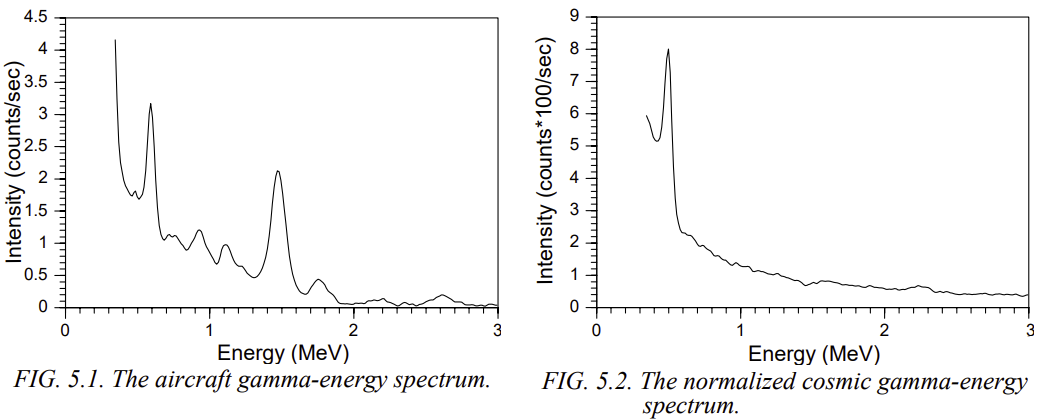
Aircraft background contributions can vary significantly between different aircraft.
Cosmic stripping factors re largely independent of the number of detector packages but may vary slightly across installations.
Reviewing Results
Once processing is complete, review the raw, filtered, levelled, and corrected channels in the profile window to assess the impact of each correction step. If the results are unsatisfactory, adjust the parameter values and rerun the GX.
*GX.NET tools are embedded in the geogxnet.dll file located in the \Geosoft\Desktop Applications\bin folder. To run this GX interactively (outside the menu), first navigate to the bin directory and provide the GX.NET tool in the required format. See the Run GX topic for more guidance.
References
- [1] G. Erdi-Krausz et al. (2003), Guidelines for Radioelement Mapping Using Gamma Ray Spectrometry Data, IAEA-TECDOC-1363, International Atomic Energy Agency.
https://www-pub.iaea.org/MTCD/Publications/PDF/te_1363_web.pdf
Got a question? Visit the Seequent forums or Seequent support
Copyright (c) 2025 Bentley Systems, Incorporated. All rights reserved.
Privacy | Terms of Use