
Height Correction
Use the RPS > Height Correction option (geogxnet.dll(Geosoft.GX.Radiometrics.HeightCorrection;Run)*) to correct for atmospheric attenuation caused by the sensor’s elevation above ground level. This tool adjusts airborne radiometric data to account for the air gap between the sensor platform and the terrain. Corrections are applied to the Potassium (K), Uranium (U), Thorium (Th), and Total count (TC) channels. For more information, refer to the Application Notes below.
To rerun the process with previous settings, select the header cell of any channel created by the process, then right-click to open the context menu. The last item in the menu represents the most recently executed process (GX). Select it to reopen the associated dialog. From there, you can rerun the process with the existing settings, adjust parameters before execution, or simply close the dialog. Learn more about Dynamic Process Links (Makers).
Height Correction dialog options
|
Input channel suffix |
If Compton Stripping has been run on the current database, the suffix for the generated channels is automatically detected and preselected. If multiple sets exist, all suffixes are listed, with the most recent one selected by default. Once a suffix is chosen, the associated channels are listed below the field. Script Parameter: SPECTRO.HEIGHT_CORRECTION_INPUT_SUFFIX |
|
Input total count (TC) channel |
Select the input TC channel. Defaults to Compton Stripping is not applied to this channel. Script Parameter: SPECTRO.HEIGHT_CORRECTION_INPUT_TC |
|
STP altitude channel |
Select the STP-corrected altitude channel. Defaults to RALTSTP, if this channel is present in the database. Script Parameter: SPECTRO.RALTSTP |
|
Nominal survey altitude (m) |
Enter the baseline altitude value to be used for height correction. To use the middle height from the selected STP altitude channel, click the calculator button next to the field. Script Parameter: SPECTRO.NOMALT |
|
Height Attenuation Coefficients Specify the height attenuation coefficients (per metre at STP) - enter new values or accept the displayed defaults. See the Application Notes for more details. |
|
|
Potassium (K) |
Enter the attenuation coefficient for the Potassium (K) channel. Default: -0.0088 Script Parameter: SPECTRO.KATTEN |
|
Uranium (U) |
Enter the attenuation coefficient for the Uranium (U) channel. Default: -0.0082 Script Parameter: SPECTRO.UATTEN |
|
Thorium (Th) |
Enter the attenuation coefficient for the Thorium (Th) channel. Default: -0.007 Script Parameter: SPECTRO.THATTEN |
|
Total count (TC) |
Enter the attenuation coefficient for the Total count (TC) channel. Default: -0.007 Script Parameter: SPECTRO.TCATTEN |
|
Output channel suffix |
Specify the suffix to append to output channels. Default: As you type, the information string below the field updates to reflect the new output channel names. Script Parameter: SPECTRO.HEIGHT_CORRECTION_OUTPUT_SUFFIX |
Application Notes
Removing the Effects of Attenuation
In airborne surveying, the detector’s altitude varies continuously as the aircraft follows its flight path. To ensure consistency, data must be corrected to a nominal survey height. Within the typical altitude range encountered in airborne surveys, window count rates exhibit an approximately exponential relationship with height.
The estimated count rate at the nominal survey height is given by the equation (IAEA, 2003 [1]):
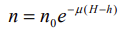
Where:
n = Corrected count rate normalized to the nominal survey terrain clearance H
n0= Count rate at STP-equivalent height, h
µ = Height attenuation coefficient for that window (per metre at STP) (*the linear attenuation coefficient in air is calculated during the calibration stage)
H = Nominal height or terrain clearance
h = Survey STP height ( i.e., the height corrected for temperature and pressure)
Since air density—and therefore attenuation—varies with temperature and pressure, the height used in the equation above must be corrected for the ambient temperature and pressure.
Attenuation Coefficients
Before running the GX, you must provide attenuation coefficients for each channel. These values are typically supplied by your survey contractor, who conducts a trial survey at multiple altitudes over a calibration range. The procedure for determining these coefficients is outlined in the IAEA technical report [1].
Height attenuation coefficients for each window are calculated from data collected during the calibration survey, which is flown at various altitudes (e.g., 60, 90, 120, …, 240 m). The coefficients are derived from an exponential regression of each background-corrected and stripped channel count rate against detector height.
The illustration below is taken from the referenced IAEA [1].
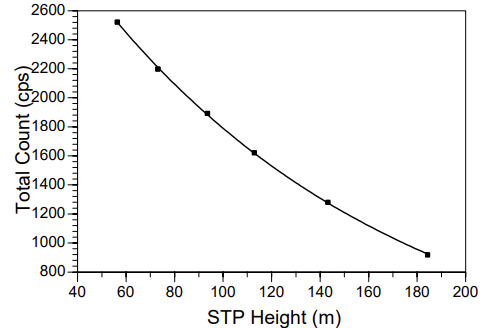
Height attenuation regression plot for the total-count window
If you don’t have custom values available or simply want to test the processing system, you can use the typical coefficients displayed in the Height Attenuation Coefficients section. These coefficients help correct for the loss of gamma signal strength due to air absorption, resulting in more accurate ground-level concentration estimates.
*GX.NET tools are embedded in the geogxnet.dll file located in the \Geosoft\Desktop Applications\bin folder. To run this GX interactively (outside the menu), first navigate to the bin directory and provide the GX.NET tool in the required format. See the Run GX topic for more guidance.
References
- [1] G. Erdi-Krausz et al. (2003), Guidelines for Radioelement Mapping Using Gamma Ray Spectrometry Data, IAEA-TECDOC-1363, International Atomic Energy Agency.
https://www-pub.iaea.org/MTCD/Publications/PDF/te_1363_web.pdf
Got a question? Visit the Seequent forums or Seequent support
Copyright (c) 2025 Bentley Systems, Incorporated. All rights reserved.
Privacy | Terms of Use